
UPPSC GIC Lecturer Mains Application Form 2026 Out, Apply Online at uppsc.up.nic.in
UPPSC GIC Lecturer Mains Application Form 2026 is now available on the official UPPSC website for candidates who cleared the Prelims Exam held on June 14 and 17, 2026. The official notification, aims to fill 1,516 Lecturer posts in Government Inter Colleges across Uttar Pradesh. Eligible candidates can complete the mains application process between July 29 and August 12, 2026, while UPPSC GIC Lecturer mains exam is scheduled for August 30, 2026.
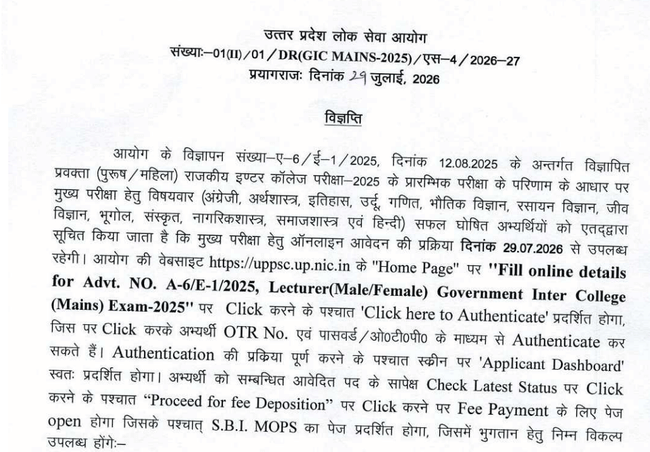
UPPSC GIC Lecturer Mains Application Form 2026 (Link Active)
UPPSC GIC Lecturer Lecturer Mains Application Form 2026 Out
UPPSC GIC Lecturer Lecturer Mains Application Form 2026 has been released online for candidates declared qualified in the prelims exam. UPPSC GIC Lecturer Recruitment aims to fill 1,516 lecturer vacancies across government inter-colleges in Uttar Pradesh. The recruitment includes 777 vacancies for Male Branch, 694 for the Female Branch, 43 vacancies for Special Secondary Schools, and 2 vacancies for Jail Training Schools. Candidates who qualify in the mains exam will proceed to the interview round, followed by document verification.
UPPSC GIC Lecturer Lecturer Mains Application Form 2026: Overview
| Particulars | Details |
|---|---|
| Conducting Body | Uttar Pradesh Public Service Commission (UPPSC) |
| exam | UPPSC GIC Lecturer Lecturer Recruitment exam |
| Stage | Mains Application Form |
| Total Vacancies | 1,516 |
| Male Branch Vacancies | 777 |
| Female Branch Vacancies | 694 |
| Special Secondary School Vacancies | 43 |
| Jail Training School Vacancies | 2 |
| Application Mode | Online |
| Login Required | OTR Number & Password |
| Selection Process | Prelims Exam, Mains Exam, Interview, Document Verification |
| Official Website | https://uppsc.up.nic.in |
UPPSC GIC Lecturer Lecturer Mains Application Form 2026: Important Dates
Uttar Pradesh Public Service Commission has announced the important dates related to UPPSC GIC Lecturer Lecturer recruitment process. Candidates should keep track of all deadlines to ensure timely submission of the mains application form.
| Event | Date |
|---|---|
| Short Notification Released | 11 Aug, 2025 |
| Detailed Notification Released | 12 Aug, 2025 |
| Online Application Started | 12 Aug, 2025 |
| Last Date to Submit Application | 12 Sep, 2025 |
| Last Date for Fee Payment | 12 Sep, 2025 |
| Fee Reconciliation/Correction | 19 Sep, 2025 |
| UPPSC GIC Lecturer Lecturer Prelims Result | Released |
| UPPSC GIC Lecturer Lecturer Mains Application Form | Active |
| Mains Exam Date | 30 Aug, 2026. |
Steps to Apply for UPPSC GIC Lecturer Mains
UPPSC GIC Lecturer Lecturer candidates who have qualified for the prelims exam can submit the mains Application Form 2026 through the official UPPSC portal. Before starting the application process, applicants should ensure they have a valid One Time Registration (OTR) number, login credentials, scanned documents, and online payment details ready.
Step 1: Visit the Official UPPSC Website
Open the official Uttar Pradesh Public Service Commission website and navigate to the "Apply Online" or "Candidate Dashboard" section.
Step 2: Login Using OTR Credentials
Enter your One Time Registration (OTR) Number and password to access your candidate dashboard. Candidates who have not completed OTR registration must register first, as the mains application process is OTR-based.
Step 3: Open UPPSC GIC Lecturer Lecturer Mains Application Form
Click on UPPSC GIC Lecturer Lecturer Mains exam 2026 application link available in your dashboard. Read the instructions carefully before proceeding.
Step 4: Verify Personal & Educational Details
Most personal details will be fetched from your OTR profile. Carefully verify:
- Candidate's Name
- Father's/Mother's Name
- Date of Birth
- Category
- Educational Qualifications
- Subject Applied For
- Communication Details
If any discrepancy is found, update it according to UPPSC guidelines before final submission.
Step 5: Upload Required Documents
Upload the necessary documents in the prescribed format and file size specified by UPPSC. Ensure that all uploaded documents are clear and legible.
Step 6: Pay the Application Fee
Proceed to the online payment gateway and pay the applicable exam fee using any of the available payment methods.
- Debit Card
- Credit Card
- Net Banking
- UPI
- Other online payment options
Step 7: Preview the Application Form
Before submitting the application, review all the entered details carefully. Verify:
- Personal information
- Educational qualifications
- Uploaded documents
- Category details
- Payment status
Step 8: Submit the Application Form
After verifying all details, click the Submit button to complete the application process. Once submitted, no changes may be allowed except during any correction window announced by UPPSC.
Step 9: Download the Confirmation Page
Download and print the final submitted application form and payment receipt for future reference. Candidates should keep multiple copies until the recruitment process is completed.
Required Documents for UPPSC GIC Lecturer Mains Application Form
UPPSC GIC Lecturer Lecturer Mains Application Form 2026 requires candidates to have all necessary documents ready before filling out the application. Having the required documents in advance helps avoid delays during the online application process.
| Document | Purpose |
|---|---|
| OTR Number & Password | Candidate Login |
| Recent Passport-size Photograph | Identity Verification |
| Candidate's Signature | Application Submission |
| Class 10 Certificate | Date of Birth Proof |
| Graduation/Postgraduate Mark Sheets & Certificates | Educational Qualification |
| B.Ed./Equivalent Qualification (if applicable) | Eligibility Proof |
| Category Certificate (SC/ST/OBC/EWS) | Reservation Benefit |
| PwBD Certificate (if applicable) | Reservation Claim |
| Government-issued Photo ID (Aadhaar/PAN/Voter ID/Driving Licence) | Identity Verification |
| Domicile Certificate (if applicable) | Reservation/State Eligibility |
| Experience Certificate (if required) | Supporting Document |
Note: All documents should be uploaded in the format and dimensions prescribed by UPPSC. Candidates should ensure that scanned copies are clear and readable.
UPPSC GIC Lecturer Lecturer Mains Application Fee 2026
UPPSC GIC Lecturer Lecturer Mains exam candidates are required to pay the prescribed application fee online while submitting the application form for 2026. The application will be considered complete only after successful payment of the exam fee.
| Category | Application Fee |
|---|---|
| General / OBC / EWS | ₹125 |
| SC / ST | ₹65 |
| PwBD | ₹25 |
| Ex-Servicemen | ₹65 |
Accepted Payment Modes
- Debit Card
- Credit Card
- Net Banking
- UPI
- Other online payment gateways approved by UPPSC
Note: Candidates should verify the application fee mentioned in the detailed notification before making the payment. The fee once paid is generally non-refundable.
UPPSC GIC Lecturer Photo & Signature Specifications
UPPCS GIC Lecturer candidates must upload their photograph and signature exactly as prescribed by UPPSC. Images that do not meet the required specifications may lead to rejection of the application.
| Particular | Specification |
|---|---|
| Photograph | Recent colour passport-size photograph |
| Background | Plain white or light-coloured |
| Face Visibility | Clear and unobstructed |
| Signature | Running signature using black/blue ink |
| File Format | As prescribed by UPPSC |
| File Size | As prescribed by UPPSC |
Guidelines for Uploading Images For UPPCS GIC Lecturer c
- Upload a recent photograph with a clear front-facing view.
- Avoid wearing sunglasses, caps, or face coverings unless permitted for valid reasons.
- Ensure the signature is consistent with the one that will be used during the exam and document verification.
- Do not upload blurred, cropped, or edited images.
- Check the uploaded files in the preview before final submission to avoid rejection.
Common Errors While Applying for UPPSC GIC Lecturer Mains
UPPSC GIC Lecturer Lecturer Mains Application Form 2026 often sees many applications rejected due to avoidable mistakes during the online submission process. Candidates should avoid the following errors while filling out the application form.
| Mistake | How to Avoid It |
|---|---|
| Entering incorrect personal details | Verify details with Class 10 certificate and OTR profile before submission. |
| Using an inactive mobile number or email ID | Provide only active contact details for future communication. |
| Uploading blurred or incorrect documents | Upload clear scanned copies in the prescribed format. |
| Selecting the wrong subject or category | Review all selections carefully before submitting the application. |
| Waiting until the last date | Complete the application early to avoid server issues. |
| Not checking the application preview | Review all entered details before clicking the final submit button. |
| Forgetting to pay the application fee | Ensure the payment is successful and verify the transaction status. |
| Not downloading the confirmation page | Save and print the submitted application form and payment receipt. |
Next Steps After UPPSC GIC Lecturer Mains Application
After UPPSC GIC Lecturer Lecturer Mains exam, candidates should keep track of the upcoming recruitment stages. The next steps are:
- Release of Mains Admit Card on the official UPPSC website.
- UPPSC GIC Lecturer Lecturer Mains Exam scheduled for August 30, 2026.
- Declaration of Mains Result for shortlisted candidates.
- Interview Round for candidates who qualify the mains exam.
- Document Verification of selected candidates.
- Final Merit List and Appointment based on the combined performance in the mains exam and interview.
UPPSC GIC Lecturer Lecturer Mains Application Form 2026 allows shortlisted candidates to proceed to the next recruitment stage. Applicants must submit the online application early, verify details, upload required documents, and keep a copy for reference. Timely submission and following guidelines will prevent issues in the recruitment process.
UPPCS GIC Lecturer Application Form 2026 FAQs
Ques: Can I apply for more than one subject in UPPSC GIC Lecturer Lecturer Recruitment?
Ans: No. Candidates can apply only for the subject for which they have been declared qualified and meet the eligibility criteria specified by UPPSC.
Ques: How will I know whether my UPPSC GIC Lecturer Lecturer Mains Application Form has been submitted successfully?
Ans: After successful submission, the system generates an application confirmation page and payment acknowledgment. Candidates should download and save both documents for future reference.
Ques: What is the next stage after submitting UPPSC GIC Lecturer Lecturer Mains Application Form?
Ans: After the application process concludes, UPPSC will release the mains admit card. Candidates who qualify the mains exam will be shortlisted for the interview and document verification rounds.
Ques: What should I do if I forget my OTR password?
Ans: Candidates can recover their OTR password through the "Forgot Password" option available on the UPPSC login page using their registered mobile number or email ID.
Download the PREPP App and attempt FREE UPPSC GIC Lecturer Mock Tests and get complete study material!


Comments