UPPSC Mains Admit Card 2025 Out at uppsc.up.nic.in, Download Hall Ticket
What's New in UPPSC?
- March 25,2026: The Uttar Pradesh Public Service Commission has released the Mains admit card on March 21, 2026, with the exam scheduled from March 29 to April 1, 2026 in two shifts daily (9:30 AM–12:30 PM and 2:00 PM–5:00 PM). It includes updated details like exam centre, reporting time, and important exam-day instructions. Download Admit Card
- September 30, 2025: Uttar Pradesh Public Service Commission (UPPSC) released the Prelims 2025 admit card on September 30, 2025, for the exam scheduled on October 12, 2025. Candidates can download the admit card from the official UPPSC website by entering their registration details and must carry the printed admit card to the exam center for entry. Download Admit Card
Uttar Pradesh Public Service Commission (UPPSC) has officially released the UPPSC PCS Mains 2025 admit card on March 21, 2026 for candidates who qualified in the prelims exam. Candidates appearing for the Combined State/Upper Subordinate (PCS) Mains exam can download their admit cards from the official website uppsc.up.nic.in by entering their login credentials. The Mains exam is scheduled to be conducted from March 29 to April 1, 2026, in multiple shifts each day (9:30 AM to 12:30 PM & 2:00 PM to 5:00 PM). The admit card contains important details such as exam date, exam centre, shift timings, and essential instructions to be followed on the exam day.
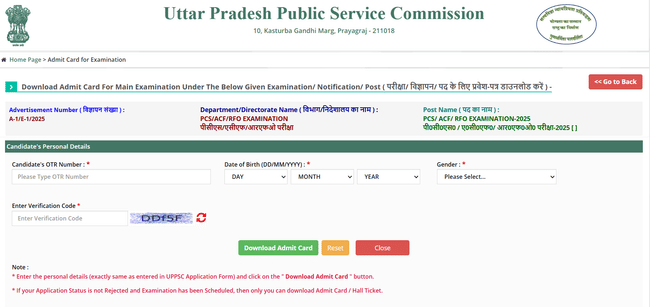
How to Download UPPSC PCS Admit Card 2025
Candidates can download UPPSC PCS Prelims Admit Card from the official website by following these steps:
- Go to the official website of UPPSC: uppsc.up.nic.in
- On the homepage, look for the “Download Admit Card” link for PCS Prelims 2025.
- Enter the required login credentials, i.e. Registration Number, Date of Birth (DOB), Gender.
- Click on the “Download” or “proceed” button.
- Take a printout of your UPPSC PCS 2025 Admit Card for future reference.
Details Mentioned in UPPSC PCS 2025 Admit Card
Candidates must download and ensure the following details are mentioned accurately in UPPSC PCS admit card:
- Candidate’s name, photo, signature, date of birth, gender and category,
- Candidate’s registration number and roll number.
- Date of exam, time and exam venue.
- Reporting time and duration of the exam.
- Instructions to be followed during the exam.
In case of any errors, contact UPPSC helpdesk immediately.
Discrepancies in UPPSC PCS 2025 Admit Card
Here are some common discrepancies the candidates commonly face with their UPPSC PCS Admit Card:
- Misspelled Name
- Incorrect Date of Birth
- Incorrect Category or Registration number
- Incorrect exam centre or exam timings.
- Missing photograph
If any of this discrepancy is found, contact UPPSC helpdesk immediately. Discrepancies should be resolved before the examination date to avoid any disqualification or denial.
UPPSC PCS 2025 Exam Day Guidelines
On UPPSC PCS exam day, candidates should ensure the following before reporting to the exam venue:
- It is mandatory to keep a printout of the UPPSC PCS Admit Card along with your valid ID proof.
- Reach the exam centre one hour before the examination.
- Follow the instructions mentioned in the admit card.
- Carry only the required stationery items.
- Make sure that you follow all the instructions provided by the exam invigilator. Failure of so may lead to disqualification.
UPPSC PCS 2025 Admit Card FAQs
Ques: Where can I download the UPPSC PCS 2025 admit card?
Ans: You can download the UPPSC PCS 2025 Admit Card from the official UPPSC website.
Ques: What should I do if I forget my registration number?
Ans: If you forget your registration number, use the “Forgot registration number” option. Then use your login credentials (email or phone number) to recover it.
Ques: Is it mandatory to carry a printout of the admit card to the exam centre?
Ans: Yes, a hardcopy of your UPPSC PCS Admit Card is mandatory to be carried to the exam centre.
Ques: What if there is a mistake in my UPPSC PCS Admit Card details (like name or category)?
Ans: If there is a mistake in your UPPSC PCS Admit Card, contact UPPSC immediately via email or helpline to get it corrected before the exam date.
Ques: Can I change my exam centre after downloading the admit card?
Ans: No, Once the admit card is issued, the exam centre is final and cannot be changed under normal circumstances.
Ques: What credentials are required to download the UPPSC Mains Admit Card 2026?
Ans: To download your UPPSC PCS Admit Card, you are required to have your registration number and date of Birth to log in and download your admit card.
Download the PREPP App and attempt FREE UPPSC Mock Tests and get complete study material!

Full Test - 05 : UPPSC CSAT 2025
Full Test - 04 : UPPSC CSAT 2025
UPPSC Prelims 2025 GS Question Paper (12-Oct-2025)
UPPSC Prelims 2025 CSAT Question Paper (12-Oct-2025)

17 February 2025 | The Hindu Must Read Articles | Current Affairs

16 February 2026 | The Hindu Must Read Articles | Current Affairs

13 February 2026 | The Hindu Must Read Articles | Current Affairs









Comments