CDS 2 2026 Application Deadline Extended, Apply Online for 451 Vacancies
UPSC CDS 2 2026 application process is underway for admission to the Indian Military Academy (IMA), Indian Naval Academy (INA), Air Force Academy (AFA), and Officers’ Training Academy (OTA). Candidates can submit their applications through the official UPSC portal by completing the One-Time Registration (OTR), filling in the online form, uploading the required documents, and paying the applicable fee. As per the latest update, UPSC has extended CDS 2 2026 application deadline from June 9 to June 11, 2026 (upto 6:00 PM), allowing eligible candidates additional time to apply. CDS 2 2026 written exam is scheduled to be conducted on September 13, 2026.
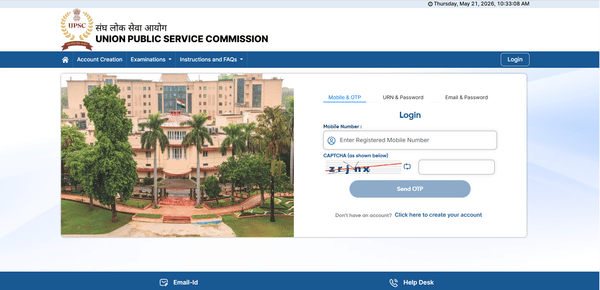
CDS 2026 Application Dates
CDS 2026 Application Dates have been released by the UPSC. Here is the table of important dates:
| Event | CDS 2 2026 |
|---|---|
| CDS 2 Notification 2026 Release Date | May 20, 2026 |
| CDS 2 Online Application Process 2026 Starts | May 20, 2026 |
| Last Date to Apply for CDS 2 2026 | June 11, 2026 (upto 6:00 PM) |
| CDS 2 Admit Card 2026 Release Date | TBA |
| CDS 2 Exam Date 2026 | September 13, 2026 |
CDS Eligibility Criteria 2026
CDS Eligibility Criteria are the preliminary guidelines determining the candidates’ qualification for CDS 2026 exam:
1. Nationality
- The candidate must be a citizen of India or a subject of Bhutan/Nepal.
- Refugees of Tibetan origin who came to India before January 1, 1962, can also apply, provided they have an eligibility certificate issued by the Indian government.
2. Age Limit and Marital Status
- Indian Military Academy (IMA): Male candidates born between July 2, 2003, to July 1, 2008, are eligible.
- Indian Naval Academy (INA): Male candidates born between July 2, 2003, to July 1, 2008, are eligible.
- Air Force Academy (AFA): Male candidates aged 20 to 24 years as on 1st July 2026 i.e. born not earlier than 2nd July 2003 and not later than 1st July 2007, can apply.
- Officers Training Academy (OTA): Male and female candidates aged between 19 to 25 years as on 1st July 2026 i.e. born not earlier than 2nd July 2002 and not later than 1st July 2008, are eligible. Male candidates must be unmarried, while female candidates can be unmarried or widows/divorcees without dependents.
3. Educational Qualifications
- IMA and OTA: Bachelor's degree from a recognized university.
- INA: Bachelor's degree in Engineering from a recognized university.
- AFA: Bachelor's degree with Physics and Mathematics at 10+2 level or Bachelor of Engineering.
4. Physical Standards
Candidates must be physically fit as per the standards prescribed by the UPSC for the Combined Defence Services Examination.
CDS 2026 Application Process
CDS 2026 Application Process is conducted online via the UPSC official website. Follow the steps below to apply for CDS 2 2026 Exam:
Step 1: Registration
1. Visit the UPSC Official Website: Go to www.upsc.gov.in and click on the "Apply Online" link.
2. Click on CDS 2026 Exam Link: You will find the link for the CDS 2026 exam under the "Online Application for Various Examinations" section.
3. Part I Registration: Enter your personal details such as name, date of birth, address, and educational qualifications.
4. Part II Registration: After completing Part I, you will receive a registration ID. Use this to complete Part II, which involves selecting your exam preferences, uploading documents, and paying the application fee.
Step 2: Filling CDS Application Form
1. Personal Information: Provide details like full name, father’s/mother’s name, date of birth, gender, nationality, and marital status.
2. Educational Qualifications: Enter your educational details as per the requirements for the academies you're applying for (IMA, INA, AFA, or OTA).
3. Exam Preferences: Choose your preferred exam centers (usually three) from the list of available locations.
4. Photo, Signature, and ID Proof: Upload scanned copies of your recent passport-size photograph, signature, and a photo ID proof (Aadhaar card, PAN card, driving license, etc.).
5. Declaration: Read the declaration carefully, check the box, and submit your application.
Step 3: Payment of Application Fee
The application fee can be paid either online or offline.
- Online Payment: Use net banking, debit card, or credit card to make the payment.
- Offline Payment: Generate an e-challan and pay the fee at any SBI branch within the stipulated time.
| Category | Application Fee |
|---|---|
| General/OBC | ₹200 |
| Female/SC/ST | Exempted |
After successful payment, download and save the receipt for future reference.
Step 4: Application Form Correction (if necessary)
The UPSC provides a correction window for candidates to rectify any mistakes in their application form. This facility is available for a limited time after the application period closes.
Step 5: Download and Print the Application Form
After successfully submitting the form and payment, download a copy of the submitted application for your records. This will include your registration number, which will be required for future logins and correspondence.
CDS 2026 Application Withdrawal Process
UPSC provides an option to withdraw applications after submission if a candidate decides not to appear for the exam. The process involves:
1. Visiting the UPSC website.
2. Logging in using the registration ID.
3. Confirming the withdrawal via an OTP sent to the registered mobile number.
4. After confirmation, the application is considered withdrawn.
Please note that the application fee will not be refunded after withdrawal.
Documents Required for CDS 2026 Application Process
Ensure you have the following documents handy while applying for CDS 2026:
1. Recent passport-size photograph (JPG format, file size: 20-300 KB)
2. Signature scan (JPG format, file size: 20-300 KB)
3. Valid photo ID proof (Aadhaar card, PAN card, passport, driving license, etc.)
4. Educational certificates (if applicable)
5. Category certificate (for SC/ST/OBC candidates if applicable)
Common Application Mistakes to Avoid
1. Entering Incorrect Personal Details: Ensure that details such as name and date of birth match those on the matriculation certificate.
2. Uploading Incorrect Documents: Only JPG (for photos and signatures) and PDF (for ID proof) formats are accepted. Ensure files are within the required size limit.
3. Late Fee Payment: The application is incomplete without the payment of the required fee.
4. Choosing Wrong Exam Center: Exam centers cannot be changed once selected.
Candidates must verify their CDS 2 eligibility 2026 before filling CDS 2 2026 application. UPSC clearly states that a candidate’s admission is provisional until their eligibility is confirmed through original documents. Therefore, candidates must carefully enter their eligibility details to avoid any issue.
CDS 2 Application Form 2026 FAQs
Ques: How can I apply for CDS 2026?
Ans: You can apply online through the official UPSC website by completing the One Time Registration (OTR) process and filling out the CDS application form.
Ques: What is the application fee for CDS 2026?
Ans: The application fee is ₹200 for General/OBC/EWS male candidates, while SC/ST/Female candidates are exempted from paying the fee.
Ques: Can I edit the CDS 2026 application form after submission?
Ans: Yes, UPSC provides an application correction window where you can make changes to your submitted application form.
Ques: What documents are required for the CDS 2026 application?
Ans: You'll need a scanned photograph, signature, identity proof (Aadhar, PAN, Voter ID), and educational certificates while filling out the CDS 2026 application form.
Ques: Who is exempt from the CDS application fee?
Ans: Female candidates and those belonging to SC/ST categories are exempt from paying the CDS application fee.
Ques: What should I do if I make a mistake in my application?
Ans: You can correct any mistakes during the application correction window provided by UPSC after the submission deadline.
Ques: Can final-year students apply for CDS 2026?
Ans: Yes, final-year students can apply, but they must submit proof of passing at the time of the SSB interview if shortlisted.
Ques: Can I withdraw my CDS application after submission?
Ans: Yes, UPSC allows candidates to withdraw their application during the specified withdrawal period, but the application fee is non-refundable.
Ques: How do I know if my application is accepted?
Ans: You will receive an email confirmation after successful submission. Additionally, admit cards will be released for eligible candidates before the exam date.
Download the PREPP App and attempt FREE CDS Mock Tests and get complete study material!

Full Test - 10 : UPSC CDS (Elementary Mathematics)
Full Test - 09 : UPSC CDS (Elementary Mathematics)
CDS 2 2026 Maths Question Paper (13-Sep-2026)
CDS 1 2026 GK Question Paper (12-Apr-2026)

17 February 2025 | The Hindu Must Read Articles | Current Affairs

16 February 2026 | The Hindu Must Read Articles | Current Affairs

13 February 2026 | The Hindu Must Read Articles | Current Affairs









Comments