RPSC RAS Application Form 2026 Out: Apply Online at rpsc.rajasthan.gov.in
RPSC RAS Application Process 2026 has started through the official RPSC portal following the release of the notification on May 27, 2026. Eligible candidates can submit their online applications from June 4 to July 3, 2026, for 607 vacancies under Rajasthan State and Subordinate Services Combined Competitive Exam 2026. Applicants must complete the One-Time Registration (OTR), fill in personal and educational details, upload the required documents, and pay the prescribed application fee online.
Apply Online for RPSC RAS 2026 (Link Active)
How to Apply Online for RPSC RAS 2026?
RPSC RAS application process must be completed online. The process includes registration, form completion, document upload, and fee payment. Candidates can follow the steps below to apply online for RPSC RAS 2026:
Step 1: Visit the Official RPSC Portal
Go to the official Rajasthan Public Service Commission website and open the “Recruitment” or “News & Events” section, where the RAS 2026 application link will be activated once released.
Step 2: Open the Online Application Link
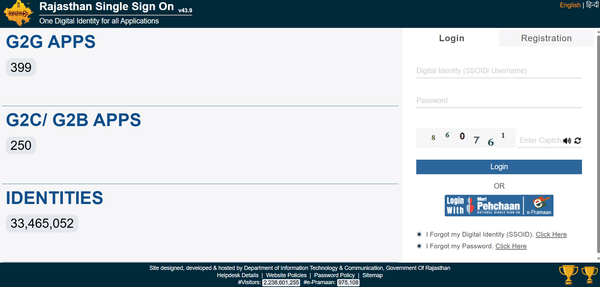
Click on the Apply Online button for RPSC RAS 2026 exam. This will redirect you to the Rajasthan SSO (Single Sign-On) login page, as all state recruitment applications are processed through the SSO portal.
Step 3: Login or Create an SSO ID
Existing users can directly log in using their SSO ID and password.
New users must create an SSO account using one of the available options, such as Aadhaar, Jan Aadhaar, Facebook, Google, or email/mobile registration.
Step 4: Select RPSC RAS 2026 Application Form
After logging in, navigate to the “Citizen” apps section and click on the Recruitment Portal.
Under ongoing recruitments, select RPSC RAS 2026. The application form will open on your screen.
Step 5: Fill in Personal Information
Enter your name, date of birth, gender, category, domicile details, and identification document details exactly as per official records. Any mismatch may lead to rejection during document verification.
Step 6: Enter Educational Qualifications
Fill in the details of your graduation degree (which is the minimum qualification), including university name, passing year, marks/CGPA, and other relevant academic information.
Step 7: Provide Address and Contact Details
Enter your permanent and correspondence address along with a valid mobile number and email ID. These contact details will be used for exam-related communication.
Step 8: Upload Required Documents
Upload scanned copies of the following in the prescribed format and size:
Step 9: Pay the Application Fee
Pay the required fee online using Debit Card, Credit Card, Net Banking, or e-Mitra.
The fee varies based on category (General, OBC, EWS, SC/ST, etc.) as per official RPSC rules.
Step 10: Review the Entire Form
Before submitting, carefully review all sections of the application form. Editing may not be allowed after submission unless RPSC opens a correction window.
Step 11: Submit the Application
Once satisfied with the information, submit the form. A confirmation message will appear on the screen.
Step 12: Download and Print Application Receipt
After final submission, download and print the application form PDF or receipt. Keep it safely for future documentation, including preliminary, mains, and interview stages.
RPSC RAS Application Fee 2026
Candidates must pay the fee in the online mode to complete RPSC RAS application process. RPSC RAS application fee for various categories is:
| Category | Fee |
|---|---|
| General/EWS | ₹600 |
| OBC/SC/ST/PwBD | ₹400 |
Documents Required for RPSC RAS 2026
Candidates must upload the following documents as per the required specifications:
- Photo ID Proof: Aadhaar, PAN, Voter ID, Passport, or Driving Licence (200KB)
Educational Certificates: Graduation degree, mark sheets, or provisional certificate
- Photograph & Signature: Recent passport-size photo (50 KB – 100 KB) and scanned signature (20 KB – 50 KB)
- Category/Reservation Certificates: Caste, EWS, PwD, or service certificates (if applicable) (200KB)
- Other Documents: Domicile certificate or any additional documents mentioned in the official notification (200KB)
RPSC RAS 2026 Application Form Correction
RPSC provides a correction/edit option for a limited duration. Candidates can modify certain fields by following the steps:
Step 1: Visit the official RPSC website or SSO portal and log in using your credentials.
Step 2: Navigate to the “My Recruitment” / “Applied Recruitment” section.
Step 3: Click on “Edit Application” next to RAS 2026.
Step 4: Modify only the allowed fields such as personal details, address, or category.
Step 5: Pay the correction fee (₹500).
Step 6: Submit the updated application and download/print the confirmation for your records.
Note: Fields like name, date of birth, photo, and gender cannot be changed.
Candidates should note that RPSC application correction window can be used only once, and certain details, such as name, category, or mobile number, may not be editable. Applicants must carefully review all information before submitting the application to ensure accuracy.
| Relevant Links | |
|---|---|
| RPSC Syllabus | RPSC Admit Card |
| RPSC Exam Pattern | RPSC Eligibility |
RPSC RAS Application Process FAQs
Ques: Is a bachelor’s degree compulsory to apply for RPSC RAS?
Ans: Yes, a bachelor’s degree in any discipline from a recognised university is mandatory. Candidates must have completed their graduation to be eligible to apply, while there is no minimum percentage requirement.
Ques: Is application modification allowed in RPSC RAS application process?
Ans: Yes, RPSC provides a limited correction window after submission. During this period, candidates can edit certain fields of their application, but the correction can be made only once.
Ques: Can candidates change their mobile number after submitting the application?
Ans: No, candidates cannot change their mobile number after final submission. Mobile number cannot be changed even in RPSC RAS correction window.
Ques: What is the format for uploading photographs and signatures for RPSC RAS?
Ans: Candidates must upload a recent passport-size photograph in JPEG format, sized 50–100 KB. The signature should also be in JPEG format, with a file size between 20–50 KB, and both must be clear and legible.
Ques: Can candidates choose their exam centre while applying for RPSC RAS?
Ans: Candidates cannot directly choose the exam centre; RPSC allocates the centre based on availability and location. The final exam centre will be mentioned on the admit card issued before the exam.
Download the PREPP App and attempt FREE RPSC Mock Tests and get complete study material!

Full Test - 04: RPSC RAS
Full Test - 03: RPSC RAS
RPSC RAS 2024 Prelims Question Paper (Feb-02-2025)
RPSC RAS 2021 (General Knowledge & General Science) Previous Year Paper (27-Oct-2021)

17 February 2025 | The Hindu Must Read Articles | Current Affairs

16 February 2026 | The Hindu Must Read Articles | Current Affairs

13 February 2026 | The Hindu Must Read Articles | Current Affairs









Comments