AFCAT 2 2026 Application Deadline Extended, Apply Online at afcat.cdac.in
AFCAT 2 Application Process 2026 commenced on May 20, 2026, through the official AFCAT portal. Indian Air Force has invited applications for the Flying Branch, Ground Duty (Technical and Non-Technical), NCC Special Entry, and GATE-based entries for courses beginning in July 2027. The last date to submit the online application form has been extended from June 19 to June 21, 2026. Eligible male and female candidates can apply online, and AFCAT 2 2026 exam is scheduled to be held on August 8, 2026.
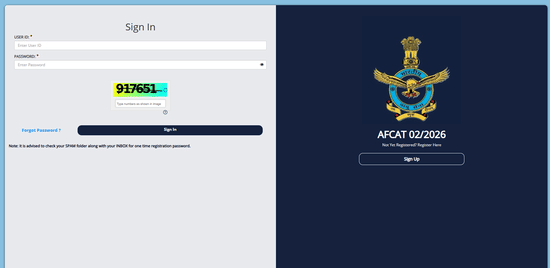
Apply Online for AFCAT 2 2026 (Link Active)
AFCAT 2 Application Dates 2026
Indian Air Force has released AFCAT 2 2026 notice on May 20, 2026. Candidates can check the important AFCAT 2 2026 application dates in the table below:
| Event | Date |
|---|---|
| AFCAT 2 2026 Detailed Notification Release Date | May 20, 2026 |
| AFCAT 2 2026 Starting Date to Apply | May 20, 2026 |
| AFCAT 2 2026 Last Date to Apply | June 21, 2026 |
| AFCAT 2 2026 Application Correction Window | TBA |
How to Apply Online for AFCAT 2 2026?
AFCAT 2 2026 application process begins on May 20, 2026. Candidates interested in joining Indian Air Force must complete the online application form within the specified dates. Candidates can follow the steps below to apply for AFCAT 2 2026:
AFCAT 2 2026 Registration
- Visit the official AFCAT 2 application portal.
- Click on the link for “AFCAT 2 2026 Application Form.”
- Complete the registration by entering basic personal details.
- Click on the submit button. The registration ID and password of the candidate will be generated.
AFCAT 2 2026 Application Form :
- Log in using the Registration ID and Password.
- Fill in personal, educational, and communication details.
- Select your Exam City Preference from the available options.
- Upload scanned copies of your Photograph, Signature, and Thumb Impression as per specifications.
- Pay the application fee through online payment modes (Credit/Debit Card or Net Banking).
- Verify all the entered details and click on ‘Submit’.
- Download and print the confirmation page for future reference.
AFCAT 2 2026 Application Fee
Candidates can pay AFCAT 2 2026 application fee only through online mode. The payment can be made using a Credit Card, a Debit Card, or Net Banking. The application fee for various categories is given below:
| Category | Application Fee |
|---|---|
| General / OBC / EWS (Male Candidates) | ₹550/- (excluding GST) |
| Women Candidates | Exempted |
| SC / ST Candidates | Exempted |
AFCAT 2 2026 application fee, once paid, will not be refunded under any circumstances. Candidates must ensure the payment is made successfully to complete the application process.
AFCAT 2 Application Correction Window 2026
AFCAT 2026 Application Correction Window will be available for the candidates to make corrections in the necessary fields. Applicants can edit specific details such as personal information and educational qualifications, and can also re-upload documents, photographs, or signatures if needed. Follow the steps below to make corrections in AFCAT 2026 application form:
Step 2: Visit the official AFCAT website - afcat.cdac.in and click on the ‘AFCAT 2026 Application Correction’ link.
Step 2: Log in using your registered email ID and password.
Step 3: Make the necessary corrections in the form, such as updating personal details, academic qualifications, or re-uploading documents, photographs, or signatures if required.
Step 4: Review all the updated details carefully and click on ‘Submit’ to confirm the changes.
Candidates must note that once AFCAT 2026 Application Correction Window closes, no further modifications will be allowed. Candidates who have successfully submitted their applications can download AFCAT 2026 Admit Card from the official website a few days before the exam.
| Relevant Links | |
|---|---|
| AFCAT Syllabus | AFCAT Admit Card |
| AFCAT Cutoff | AFCAT Exam Pattern |
AFCAT 2 2026 FAQs
Ques: Can candidates make changes in AFCAT 2 application after submitting?
Ans: Yes, candidates can make changes in their application during the correction window period in the required fields. Edits cannot be made once the correction window closes.
Ques: Is registration for AFCAT 2 2026 done separately for men and women?
Ans: No, the registration process is the same for both male and female candidates. The available vacancies and eligibility criteria vary by branch.
Ques: Can candidates apply for more than one branch in AFCAT 2 2026?
Ans: Yes, candidates can select multiple branches, such as Flying and Ground Duty, during form filling if they meet the eligibility criteria for both.
Ques: What are the specifications for uploading documents in AFCAT 2 2026 form?
Ans: Documents like the photo, signature, and thumb impression must be clear, recent, and in the prescribed size and format (JPEG/JPG) as instructed in the application form.
Ques: What should I do if my AFCAT 2 2026 confirmation page is not generated?
Ans: Ensure that the fee payment was successful. If not, recheck the payment status or contact AFCAT helpdesk for assistance.
Download the PREPP App and attempt FREE AFCAT Mock Tests and get complete study material!

Full Test - 15 : AFCAT 01/2026 (Advance)
Full Test - 14 : AFCAT 01/2026 (Advance)
AFCAT 1 2024 Memory Based Paper (16-Feb-2024) (Shift 1)
AFCAT Official Model Question Paper - II

17 February 2025 | The Hindu Must Read Articles | Current Affairs

16 February 2026 | The Hindu Must Read Articles | Current Affairs

13 February 2026 | The Hindu Must Read Articles | Current Affairs









Comments