
UPSC IFS Mains Application Form 2026 Out, Apply Online Till July 22
Union Public Service Commission (UPSC) has opened Indian Forest Service (IFS) Mains Application Form 2026 from July 13 to July 22, 2026 (6:00 PM) for candidates who qualified in the Prelims Exam. Eligible candidates must update and confirm their details through the Common Application Form on the official UPSC portal to appear for the IFS Main Exam, which is scheduled to commence on November 22, 2026. Candidates who fail to submit the application form within the deadline will not be eligible to appear for the Mains exam.
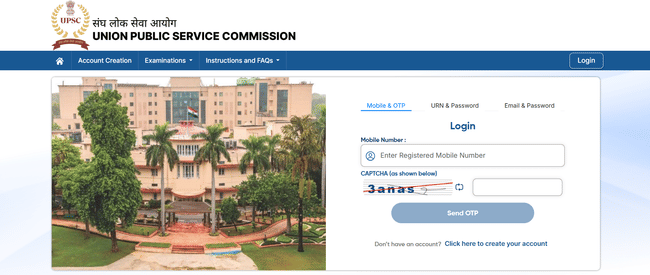
UPSC IFoS Application Process 2026
UPSC IFoS 2026 Application Process 2026 is conducted online, where candidates must complete an OTR, fill the application form, upload required documents and pay the prescribed fee. Candidates must follow the steps given below to apply the said exam in the following steps:
- Registration:
- Visit the official UPSC application portal: upsconline.nic.in
- Now, create an account by giving basic details like name, DOB, mobile number, email and register yourself.
- Once registered, you’ll get a registration number and password, which you will use further in the application process.
- Fill Out the Application Form:
- Now, log in with your Registration ID and Password.
- Fill out your personal details, educational qualifications, and category details.
- Use Save & Next to save and proceed further in the application form.
- Upload Scanned Documents:
Before starting to fill out your application form, keep the following documents ready in scanned format:
- A scanned photo ID proof (PAN Card / Voter ID / Driving License / Passport).
- A recent passport-size photograph.
- Signature in black ink on white paper.
- Educational certificates
- Certificate of reservation category (if applicable)
- Review Application:
- Before submitting your application form, carefully review all details entered and uploaded documents.
- Once satisfied, proceed further in the application form.
- Pay the Application Fee:
Candidates need to pay the application fee as per their category.
- Final Submission & Printout:
- After successfully paying the application fee, submit your application.
- Make sure to download & print your application form and payment receipt (if applicable) as they will be needed for the further application process.
UPSC IFoS Application Fee 2026
UPSC has given a category-wise application fee for UPSC IFoS, which is given below:
| Category | UPSC IFoS Application Fee (in Rs.) |
|---|---|
| General/EWS/OBC | 100 |
| SC/ST/PwBD/Ex-servicemen | Exempted |
| Female candidates of all categories | Exempted |
Candidates can fill in the application fee by-
- depositing the money in any Branch of SBI by cash, or
- by using the net banking facility of any Bank, or
- by using Visa/Master/RuPay Credit/Debit card/UPI Payment.
Documents Required for UPSC IFoS Application 2026
Candidates should make sure that they have the following documents ready before they start filling in their application form:
- A scanned photograph
- A scanned signature
- A valid email ID and Mobile number
- A valid photo ID proof (Aadhaar Card/Vote Card (EPIC) /PAN Card/Passport/Driving Licence/Any other photo ID Card issued by the State/Central Government).
- Educational certificates
- Category certificates (as per category)
Candidates need to carefully fill in their personal details, educational qualifications, reservation certificates (if applicable), and upload documents while filling UPSC IFoS 2026 form. As there is no provision for application form correction post its submission. Only those application forms will be accepted which have correct details and the fee paid. Submitting incorrect details will lead to the disqualification of the application at any stage of the selection procedure.
UPSC IFoS Application Process 2026 FAQs
Ques: Will UPSC provide any correction window after UPSC IFoS application 2026 ends?
Ans: No. UPSC does not provide a correction window. Candidates must carefully fill in their personal details, educational qualification and category details before the final submission of the application form.
Ques: What documents do I need to upload during UPSC IFoS 2026 online application form filling?
Ans: The documents that candidates need to upload are a scanned photograph, signature, valid photo ID proof (Aadhaar/PAN/Voter ID/Passport/Driving License), and category/disability certificate (if applicable).
Ques: Can I submit my UPSC IFoS 2026 application form offline?
Ans: No. UPSC doesn’t accept any application form through offline mode. It only accepts UPSC IFoS application form submitted through online mode on the UPSC portal.
Ques: What should I do in case I forget my registration ID or password?
Ans: In case you have forgotten your application form, you can retrieve your registration ID or password by using the “Forgot Registration ID” or “Forgot Password” option available on the UPSC application portal.
Ques: Do I need to send a hard copy of my UPSC IFoS application form 2026 to UPSC?
Ans: No. There is no need to send a hard copy of your application form to UPSC. Candidates should keep a printout of the online application and the fee receipt for document verification.
Ques: How will I know if my UPSC IFoS application form 2026 has been successfully submitted?
Ans: Once you have submitted your application form and payment is successful, the system will generate a confirmation page with the Registration ID. Candidates should save and print this page for their records.
Download the PREPP App and attempt FREE UPSC IFoS Mock Tests and get complete study material!


Comments