CSIR UGC NET June 2026 Application Form (Out): Check Apply Online Link
National Testing Agency has started CSIR UGC NET June 2026 application process from May 27, 2026, through the official website. Candidates applying for Junior Research Fellowship (JRF), Assistant Professor eligibility, and PhD admission can submit the online application form till June 19, 2026, and the last date to pay the exam fee is June 20, 2026. Applicants must complete registration, upload required documents, and pay the prescribed fee within the deadline for CSIR UGC NET June 2026 exam. The application correction window will remain open from June 22 to June 23, 2026 (upto 11:50 PM).
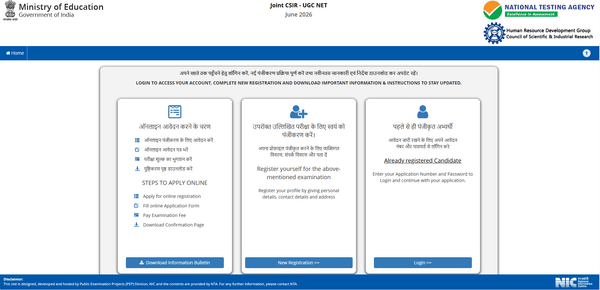
Apply Online For CSIR UGC NET June 2026 (Link Active)
Table of Contents
CSIR NET June Application Dates 2026
CSIR NET June Application Process 2026 Dates are as follows:
| Details | Dates (Tentative) |
|---|---|
| CSIR NET June 2026 Application start date | May 27, 2026 |
| Application close date | June 19, 2026 (upto 11:50 PM) |
| Last date of fee payment | June 20, 2026 (upto 11:50 PM) |
| Correction in the application form | June 22 to June 23, 2026 |
| CSIR NET June 2026 Exam Date | July 17 & June 18, 2026 |
How To Apply For CSIR NET June 2026?
To apply for CSIR NET June 2026 exam, you need to apply online. Follow the given steps for a successful registration:
- Visit CSIR UGC NET official website: csirnet.nta.nic.in
- Register using your own Email ID and Mobile No.
- Fill in the Application Form online and note down the system-generated Application Number.
- Upload scanned images of a recent passport-size photo, signature and other required documents.
- Pay the exam fee using Debit Card/Credit Card/Net Banking/UPI and take a print of the confirmation page generated after successful payment for future reference.
Documents Required For CSIR NET June Application 2026
CSIR NET June 2026 application requires the following details:
- A recent photograph (in jpg file, size 10Kb – 200Kb) against a white background
- Signature (in jpg file size: 4kb - 30kb)
- Duly verified Result Awaited Attestation Form (in PDF format, file size: 50KB to 500KB), or Degree if you have received it already
- Category Certificate, if applicable (SC/ ST/ OBC/ EWS etc.) (in PDF format, file size: 50KB to 300KB)
- PwD Certificate, if applicable (in PDF format, file size: 50KB to 300KB).
CSIR NET June Application Fee 2026
You can opt for payment via net banking/debit/credit card. The application fees for CSIR NET June are as follows:
| Details | Fees (In Rupees) |
|---|---|
| General | 1150 |
| General-EWS/OBC(NCL) | 600 |
| SC/ST/PwD/Third Gender | 325 |
CSIR NET June 2026 Document Upload Specifications for Application
The specifications for uploading documents for CSIR NET June are as follows:
| Documents | Specifications | Details |
|---|---|---|
| Photograph | 10Kb – 200Kb |
|
| Signature | 4Kb- 30Kb | JPG |
| Duly verified Result Awaited Attestation Form | 50Kb – 500Kb | |
| Category Certificate | 50Kb – 300Kb | |
| PwD Certificate | 50Kb – 300Kb |
CSIR NET June Application Correction Window 2026
CSIR NET June Application Correction Window 2026 will be open from May 22-24, 2026. During this period, you can correct any incorrect details in your application. Once the correction window is closed, the information provided in your application, such as name, contact details, category, PwD status, educational qualifications, date of birth, and exam city preferences, will be final. Any requests for changes after the correction window will not be accepted.
Follow these steps to correct your CSIR NET June application:
- Log in to the official website.
- Click on CSIR NET June correction link.
- Log in using your registration details.
- Read the instructions and click the ‘I Agree’ checkbox.
- Make the necessary changes in the application form.
- Click on the Submit button.
- Verify the corrected details.
- Review the information and click the declaration checkbox.
- Click the Final Submit button.
- Download or take a printout of the confirmation page.
For any queries or clarifications regarding CSIR NET June 2026 exam, candidates can contact NTA Help Desk at 011 40759000 or email their concerns to csirnet@nta.ac.in.
CSIR NET June 2026 Application Form FAQs
Ques: Can I apply for multiple subjects while filling out the online application of JOINT CSIR UGC NET 2026?
Ans. A candidate can fill out the application form in only one subject. You can choose from the subjects given in the Information Bulletin. However, filling in multiple forms will lead to the cancellation of the application form.
Ques: If a candidate for any reason has not appeared in the exam, is there any provision for a refund of the fee?
Ans. No, the fees will not be refunded in any case.
Ques: Can I submit more than one application form for the exam?
Ans. No, you can only submit one application at a time.
Ques: What documents or certificates do I need to upload along with the Application Form?
Ans. You need to upload the scanned images of the following while applying:
- Photograph Signature Category certificate, if applicable
- PwD certificate if applicable
- Result awaited attestation, if applicable
Ques: How can I pay the Application Fee?
Ans. Fee can be paid using SBI/ICICI Bank Payment Gateway through Debit Card/Credit Card/Net Banking/UPI. You need to keep proof of fee paid. In case the Confirmation Page is not generated after payment of fee then the transaction is cancelled, and amount will be refunded to your account.
Ques: What happens when any mistake is found in CSIR NET June Application Form 2026?
Ans. If there is any mistake in the application form, edit it during when the Application Correction Window is live. Once the window is disabled, the submitted details will be considered final and if there is any discrepancy in the same, your candidature will be canceled.
Ques: What educational documents must be submitted with CSIR NET June application form?
Ans. Candidates must upload certain educational documents to CSIR UGC NET application form, including a scanned copy of the candidate's qualifying exam mark sheet/certificate, a scanned copy of the candidate's final year mark sheet (if applicable), and a scanned copy of the candidate's enrollment certificate.
Ques: Is it possible for a candidate to apply for both the JRF and the Assistant Professorship?
Ans. Yes, individuals who meet the eligibility requirements can apply for either a JRF or an Assistant Professorship, or both. Before applying for the exam, candidates should review CSIR NET June qualifying criteria.
Ques: Is it possible to withdraw the application of CSIR NET?
Ans. CSIR NET June application form cannot be withdrawn. It can only be modified during the application correction window. Also, only certain details can be modified.
Ques: Can CSIR NET June be given in the final year?
Ans. Yes, you can take CSIR NET June in your final year. However, they need to submit a declaration to submit the marksheet by the mentioned time or else his application shall be rejected.
Download the PREPP App and attempt FREE CSIR UGC NET Mock Tests and get complete study material!

testing
French revolution
CSIR NET 2025 Chemical Science Question Paper (28-Jul-2025)
CSIR NET 2024 Life Science Previous Year Paper (01-Mar-2025) (Shift 1)

17 February 2025 | The Hindu Must Read Articles | Current Affairs

16 February 2026 | The Hindu Must Read Articles | Current Affairs

13 February 2026 | The Hindu Must Read Articles | Current Affairs









Comments