UPSC IES Admit Card 2026 Out, Download Mains Hall Ticket at upsc.gov.in
What's New in IES?
June 15, 2026: UPSC ESE Mains Admit Card 2026 released at upsc.gov.in. Download the hall ticket now and check the exam date, shift timings, and important instructions. Download Admit Card
UPSC has made the ESE Mains Admit Card 2026 available on its official website on 13 June 2026. Candidates shortlisted for the Engineering Services (Main) Examination can access and download their hall tickets using their login credentials. The UPSC ESE Mains 2026 examination will be conducted on June 21 2026. Applicants should carefully check the details mentioned on the admit card, including their exam centre, reporting time, and personal particulars, and carry a printed copy to the examination venue.
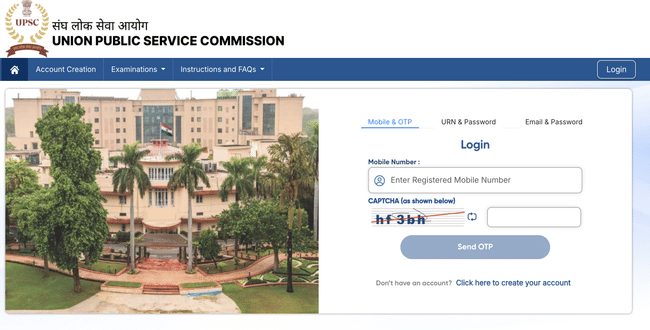
How to Download UPSC IES Admit Card 2026?
To download UPSC IES Admit Card 2026, candidates should follow these simple steps:
- Visit the official UPSC website- upsconline.gov.in or the designated UPSC IES Admit Card portal.
- Enter your Registration ID (which must be an 11-digit number without letters or special characters).
- Select your Date of Birth as recorded in your application form.
- Enter the captcha code exactly as shown (captcha is case sensitive).
- Click on the Submit button.
- Download and print your UPSC IES Admit Card 2026. It is recommended to keep multiple printed copies for safety.
Details Mentioned on UPSC IES Admit Card 2026
The admit card contains important details that candidates must verify, including:
- Candidate's full name and photograph
- Registration ID and roll number
- Exam date, time, and reporting time
- Exam center address and code
- Instructions and guidelines for the exam day
- Signature of the candidate and issuing authority
Make sure all information is accurate and matches your application details.
Discrepancies in UPSC IES Admit Card 2026
In case you notice any discrepancies like spelling errors, wrong exam center, or incorrect date of birth on your admit card, take immediate action:
- Contact UPSC through their official email: web-upsc@nic.in
- Provide your registration ID and details about the issue.
- Follow UPSC’s instructions to correct the errors promptly.
Timely correction is essential to avoid problems on exam day.
Documents to Carry to Exam Centre with UPSC IES Admit Card 2026
On the day of the exam, candidates are required to bring the following:
- Printed copy of UPSC IES Admit Card 2026 (mandatory)
- A valid photo ID proof such as Aadhaar Card, PAN Card, Passport, Voter ID, or Driving License
- Passport-size photographs as uploaded in the application form
- Any other document specified by UPSC in the admit card instructions
Without these documents, candidates may not be allowed to appear for the exam.
UPSC IES Admit Card 2026 FAQs
Ques: Is UPSC IES Admit Card 2026 available offline?
Ans: No, the admit card is only available online for download from the official UPSC portal.
Ques: Can I carry a digital copy of UPSC IES Admit Card to the exam center?
Ans: No, only a printed copy of the admit card is accepted at the exam center.
Ques: What if I forget my Registration ID to download UPSC IES Admit Card?
Ans: Use the "Forgot RID" link on the admit card portal or contact UPSC for assistance.
Ques: Can I change my exam center after downloading UPSC IES Admit Card?
Ans: No, exam centers are fixed once the admit card is issued.
Ques: Is it mandatory to carry UPSC IES Admit Card to the exam?
Ans: Yes, without the admit card, candidates will not be allowed to enter the exam hall.
Ques: Can candidates edit details on UPSC IES Admit Card after downloading?
Ans: No, candidates cannot make any changes. Contact UPSC immediately if errors are found.
Download the PREPP App and attempt FREE IES Mock Tests and get complete study material!

French revolution
Full Test - 01 : ESE Prelims Paper 2
UPSC ESE Prelims 2026 Mechanical Engineering Question Paper (08-Feb-2026)
UPSC ESE Prelims 2026 GS & Engineering Aptitude Question Paper (08-Feb-2026)

17 February 2025 | The Hindu Must Read Articles | Current Affairs

16 February 2026 | The Hindu Must Read Articles | Current Affairs

13 February 2026 | The Hindu Must Read Articles | Current Affairs









Comments