
UPSC CMS Admit Card 2026 Out; Download Hall Ticket PDF
Union Public Service Commission (UPSC) has released UPSC CMS Admit Card 2026 on July 24, 2026, for the Combined Medical Services (CMS) Exam. The Computer-Based Test (CBT) will be conducted on August 2, 2026, comprising Paper I and Paper II. Candidates who have registered for UPSC CMS 2026 can download their admit cards from the official UPSC website using their login credentials. Candidates must carry a printed copy of the admit card along with a valid photo ID to the Exam centre.
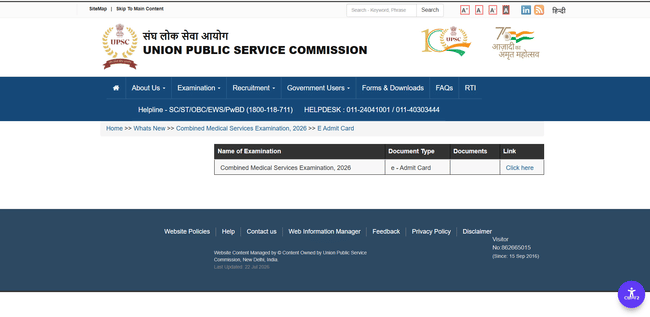
Download UPSC CMS Admit Card 2026 (Link Active)
UPSC CMS Admit Card 2026 Overview
UPSC CMS Admit Card 2026 is released online for candidates appearing in the Combined Medical Services Exam. Candidates can check the key details related to the admit card in the table below.
| Particular | Details |
|---|---|
| Exam Name | UPSC Combined Medical Services (CMS) Examination 2026 |
| Conducting Body | Union Public Service Commission (UPSC) |
| Post Name | Medical Officer (Category I & Category II) |
| Total Vacancies | 1,358 |
| Admit Card Release Date | July 24, 2026 |
| Exam Date | August 2, 2026 |
| Exam Mode | Computer-Based Test (CBT) |
| Papers | Paper I & Paper II |
| Official Website | upsc.gov.in |
| Admit Card Mode | Online |
| Login Credentials Required | Registration ID/Roll Number and Date of Birth |
Steps to Download UPSC CMS Admit Card 2026
Candidates can download their UPSC CMS Admit Card 2026 from the official UPSC website by following the steps below:
- Visit the official UPSC website and click on the Admit Card link: upsc.gov.in
- Choose the exam name as “UPSC CMS Exam 2026.”
- Enter your login credentials (Registration ID or Roll Number), along with your password or OTP.
- Enter the captcha code and click on the Login button.
- Your admit card will be displayed on the screen. Review all details carefully.
- Download and print multiple copies for future use.
Details Mentioned on UPSC CMS Admit Card 2026
After downloading UPSC CMS Admit Card 2026, candidates must thoroughly review all the details printed on it to ensure accuracy. The key details included in UPSC CMS 2026 admit card include:
- Candidate’s Name
- Candidate’s Address
- Registration Number
- Roll Number
- Father’s and Mother’s Names
- Date of Birth
- Exam Date
- Exam Centre Name and Code
- Venue Address
- Paper Pattern
- Exam Day Instructions
Note: If there is any error or mismatch in the admit card details, candidates must immediately contact UPSC officials to get it corrected before the exam day.
Candidates can connect with the following contacts in case of any discrepancy:
- Email: uscms-upsc@nic.in
- Phone: 011-23385271, 011-23381125, 011-23098543
Things to Carry Along with UPSC CMS Admit Card 2026
Candidates appearing for UPSC CMS Exam 2026 must carry the following items along with the admit card to the exam centre:
- One original photo ID proof:
- AADHAR Card
- PAN Card
- Voter ID
- Bank Passbook
- Ration Card
- Driving Licence
- One recent passport-size photograph
Candidates are strictly prohibited from carrying any electronic devices (mobile phones, smartwatches, calculators), books/notes, food items, or accessories inside the exam hall. If your ID proof does not mention your Date of Birth, carry a Birth Certificate, SSC Marksheet, or Category Certificate.
UPSC CMS Admit Card 2026 FAQs
Ques: What should I do if there are any discrepancies on my admit card?
Ans: In case of any mismatch or error, immediately contact the respective Exam authority with valid documents for correction.
Ques: What happens if candidates lose their UPSC CMS admit card?
Ans: If candidates lose their UPSC CMS admit card, they can re-download and print the admit card from the official UPSC website using their login credentials.
Ques: Can candidates carry a soft copy of their UPSC CMS admit card?
Ans: No, carrying a soft copy of UPSC CMS admit card on a digital device is prohibited. Candidates must bring a printed copy of the admit card.
Ques: Is ID proof mandatory to carry along with the admit card for UPSC CMS Exam?
Ans: Yes, a valid photo identity proof, such as an Aadhaar card, PAN card, or voter ID, must be carried along with the admit card.
Ques: Can I change my exam centre UPSC CMS exam after the admit card is released?
Ans: No, once the exam centre is allotted, candidates cannot request a change under any condition.
Download the PREPP App and attempt FREE UPSC CMS Mock Tests and get complete study material!


Comments